My Pantry Tracker
- 3.2
- Rating
- 10.00K
- Installs
- Free
- Price
 Analysis by App-foxy
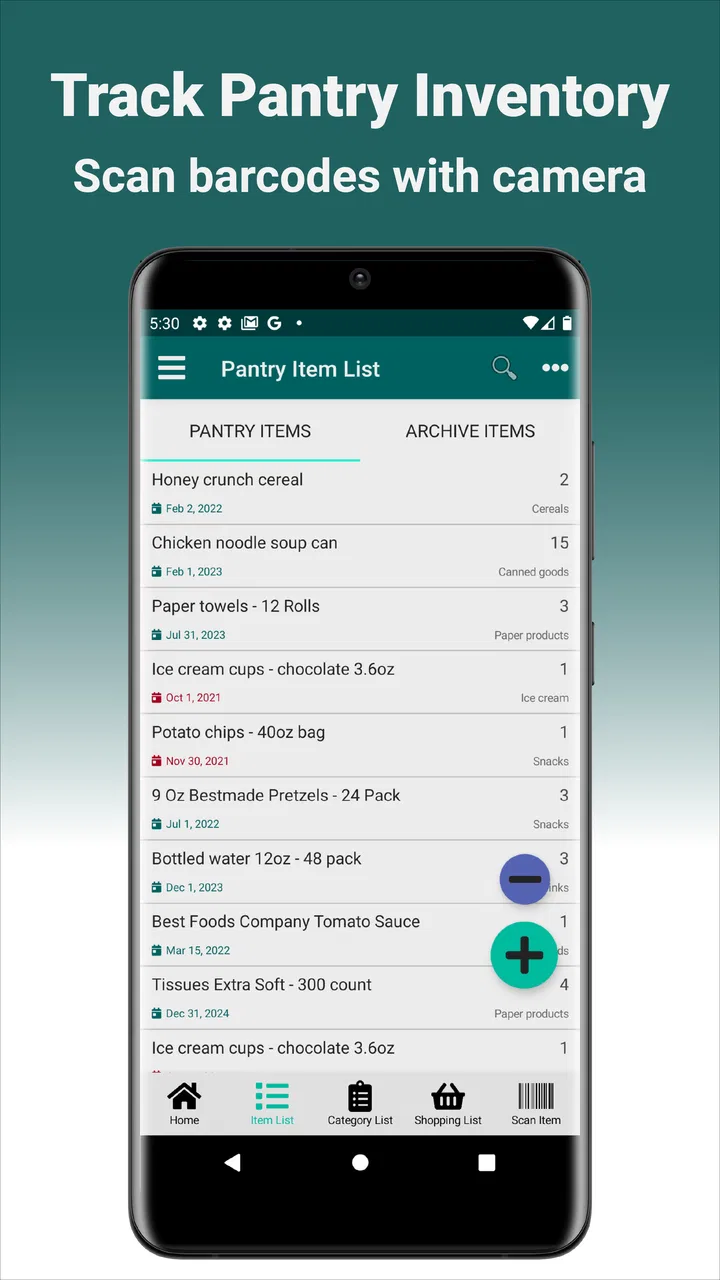
I like pantry apps when they solve a small household problem without turning grocery planning into another full-time project. My Pantry Tracker takes a focused approach: it lets me build an inventory by scanning product barcodes with the phone camera. That sounds simple, and in everyday use, simplicity is its main appeal. Instead of trying to become a complete meal planner, recipe platform, shopping marketplace, or nutrition database, it concentrates on helping me remember what is already at home.
That focus also makes the app easier to judge honestly. It is a free Food & Drink app from AppKing Software, Inc., intended for Everyone, and it runs on Android devices using version 5.0 or later. The current version is 1.8.2. Its average rating is 3.2 from around 47 ratings, with around 27 written reviews, and it has passed 10K+ installs. Those numbers suggest a modest user base rather than a universally established household tool, so I would approach it as a practical utility to test for my own routine, not as an unquestioned replacement for every pantry-management method.
What My Pantry Tracker is really useful for
The best way to understand this app is as a quick inventory layer. I can scan an item when I bring it home, keep a record of what is in the pantry, and check that list before shopping. The barcode workflow is more useful than manually typing every product name, especially after a large grocery trip. A few seconds per item can make the difference between maintaining an inventory and abandoning it after one weekend.
You May Also Like

 AccuWeather: Weather Radar
AccuWeather Review: A Quick, Clear Forecast for Everyday Decisions
For everyday plans, the best forecast is the one you can understand quickly. AccuWeather makes rain timing, radar, and local conditions easy to act on, with a few trade-offs.

 Hill Climb Racing
Why Hill Climb Racing Still Turns Crashes Into One More Run
A tiny car, a bumpy hill and one more upgrade: Hill Climb Racing keeps resurfacing because its simple chaos makes every near-miss feel personal.

 AliExpress - Shopping App
AliExpress Makes Global Shopping Feel Personal, but Shoppers Bear the Risk
AliExpress turns a global marketplace into a pocket-sized discovery engine. Its reach is useful, its shopping loop compelling, and its trade-offs easy to miss.

 Lords Mobile: Kingdom Wars
Lords Mobile Is a Kingdom-Building Routine, Not a Quick Match
A case-by-case verdict on the building, battles, device demands, and social commitments that make Lords Mobile rewarding for some players and exhausting for others.

 PDF Scanner app - TapScanner
TapScanner Makes Paperwork Easier to Capture, Check, and Share
TapScanner makes scanning with a phone feel less like a rescue operation and more like a dependable step in getting work done. Its capture tools are useful, though not flawless.

 Block Blast!
 Shows How Much a Puzzle Game Can Leave Out
A quiet grid game shows why puzzle players increasingly value instant clarity, repeatable skill and low-pressure play—and where the genre still needs to catch up.
More From Our News Desk
View All News


A realistic example is a busy weekday evening. Before leaving for the supermarket, I can look through the pantry list and notice that I already have pasta, canned tomatoes, or coffee. That does not automatically create a meal plan, but it can prevent an unnecessary duplicate purchase. The same check is useful before ordering groceries online, when it is easy to add familiar staples without remembering what is behind the other items on the shelf.
I also see value for people who share shopping duties. If one person scans new purchases and another checks the inventory before shopping, the app can provide a common reference point. It is not a substitute for communication, because an inventory can become outdated, but it gives both people something more reliable than memory. For a small household with a fairly stable pantry, that may be enough.
The barcode scanner is the central convenience, but it is also the feature that sets the limits of the experience. Products with readable, recognized barcodes should be the quickest to add. Loose produce, bakery items, leftovers, opened ingredients, and goods without a useful barcode still require a different method or a manual mental note. If most of what I buy is fresh food rather than packaged goods, the app’s main shortcut becomes less important.
Scanning is most valuable when used at the right moment
My strongest practical tip is to scan during unpacking rather than waiting until the pantry is already full. When groceries are still on the counter, the barcode is easy to reach and I can add items in one short session. Waiting until everything is stored means pulling products back out, checking labels, and deciding what was purchased recently. That extra friction is exactly what causes inventory apps to go unused.
There is another useful routine: scan replacements immediately after finishing an item, or remove the old entry while the empty container is still in hand. This creates a more trustworthy list than trying to reconstruct consumption at the end of the week. The trade-off is that the app depends on a personal habit. It can make tracking faster, but it cannot know that a can was opened, shared, discarded, or moved to another cupboard unless I keep the record current.
I would not treat the inventory as an exact accounting system. It is better understood as a reminder of likely availability. That distinction matters for ingredients used frequently. If I cook with rice every day, a list that says “rice” may be helpful, but it may not tell me whether there is enough left for the next recipe unless I actively maintain the quantity or status in whatever controls the app provides. Anyone needing precise stock levels, expiration workflows, or detailed household consumption should examine the app carefully before relying on it.
Who will appreciate the focused design
This app makes the most sense for someone who repeatedly buys packaged pantry staples and wants a lightweight way to avoid duplicates. It could suit a student, a small family, or a person who shops infrequently and forgets what is stored at home. It is also a reasonable starting point for someone who has tried spreadsheets but found them too slow, or who does not want the broader complexity of a meal-planning service.
I would be more cautious about recommending it to a large household with several people adding and removing food throughout the day. The more active the pantry, the faster a manually maintained list can drift away from reality. People managing allergies, strict dietary requirements, business food stock, or detailed expiration schedules may need specialized controls rather than a basic barcode-centered inventory.
It is also not the right choice if I expect automatic grocery lists, recipe suggestions, nutritional analysis, cloud collaboration, or deep product information. Those are different goals. A dedicated shopping-list app may be better for planning purchases, while a recipe or nutrition app may be better for deciding what to cook. My Pantry Tracker’s strength is narrower: recording pantry items with less typing.
Trust, controls, and moments that deserve attention
I find that a pantry app earns my trust less through promises than through the small choices it lets me check for myself. In this section, I’m looking at how I would handle permissions, purchases, and the growing trail of household entries with a little care, then I’ll turn to the everyday moments when those choices matter most.
What I can verify from the app’s public profile
Trust starts with clear expectations. The app is free to install, while in-app purchases range from $0.99 to $9.99 per item. That means I would check the purchase screens before assuming every part of the experience is included at no cost. The free entry point is useful for trying the scanning workflow, but a person who wants to avoid unexpected spending should pay attention to the wording and choices shown inside the app.
The age classification is Everyone, which fits a household inventory tool. Still, an age label is not the same thing as a complete explanation of data handling. I would distinguish between what the app visibly asks me to do and what I am comfortable storing in it. A pantry list may seem harmless, but repeated food records can reveal routines, preferences, or household patterns. I would avoid entering personal notes that are unrelated to inventory and would not use the app as a place for sensitive household information.
The camera is central to barcode scanning, so camera access is a natural moment to pause and read the system prompt. I would grant access only when I am ready to scan and review the operating system’s permission controls afterward. I would not assume that camera access tells me anything about broader data practices. The permission enables a device function; it does not, by itself, explain storage, sharing, retention, or account behavior.
That is the right mindset for this kind of utility: separate visible permission choices from assumptions. I can verify whether the phone asks for camera access, whether the app continues working after permission is denied, and whether the operating system lets me revoke access later. I should not treat a simple interface as proof that the app collects little information, nor should I assume that a barcode scan stays entirely on the device without checking the app’s own explanations and the platform’s privacy information.
Data-sensitive moments in ordinary use
The most data-sensitive moment is not necessarily the scan itself. It is the accumulation of entries over time. A single barcode may identify a product, but a long history of pantry items can become a detailed picture of shopping habits. I would keep the inventory limited to what I genuinely need to track, especially if the app offers optional account, backup, sharing, or synchronization choices during setup or use.
Another moment is using the camera in a crowded kitchen. Barcode scanning should be aimed at the product, not at documents, screens, or people in the background. That is a basic privacy habit, but it is easy to overlook when trying to process groceries quickly. I would also review any confirmation screen before saving an item, because a mistaken scan can create a misleading entry and may require cleanup later.
If the app presents a sign-in request, I would ask whether an account is necessary for the specific task I want. If it offers a choice between local use and a connected feature, I would choose the narrower option unless synchronization is genuinely important to me. These are not claims about what the app does; they are sensible decision points where the user can inspect the available choices instead of accepting every prompt automatically.
I would apply the same caution to purchases. Because optional items can cost from $0.99 to $9.99, I would read what each purchase unlocks, confirm the account being charged, and avoid tapping through quickly while setting up the pantry. A free app can still involve paid extras, and understanding that boundary is part of deciding whether the tool fits my budget and expectations.
How much control the user really has
User agency here depends less on advanced automation and more on my ability to keep the list accurate. I want clear ways to inspect entries, correct a mistaken scan, and remove products that are gone. I would test those basic actions immediately with a few low-stakes items. If editing or deleting feels awkward, the inventory will become less trustworthy even if the initial scanning is fast.
I would also establish a simple personal rule: the app is the source of truth only after I have completed a shopping or unpacking session. Until then, the list is provisional. That rule prevents me from treating an old entry as a guarantee that an item is still available. It also makes it easier to decide when a manual cleanup session is worthwhile, perhaps before a large shop or at the end of the week.
For shared homes, I would agree on who updates the list and when. Without that agreement, two people can scan the same item, forget to remove consumed products, or assume the other person handled the update. The app can support a shared habit only if the household creates one. If the workflow requires constant coordination, a collaborative shopping-list service may be the better fit.
I would be especially careful about treating barcode recognition as product intelligence. A barcode can speed up identification, but it does not automatically understand the condition of the item, the amount remaining, or whether the product is still usable. I would check the saved entry after scanning rather than assuming every result is perfect. That small review step is one of the most important ways to protect the quality of the inventory.
How it compares with familiar alternatives
The usual alternative is a notes app or a paper list. Those options are faster for a few items and work for foods without barcodes, but they become messy when the pantry changes often. My Pantry Tracker has the advantage of a purpose-built scanning workflow, while a plain note may be easier to customize with quantities, expiration reminders, or household comments. The better choice depends on whether speed of entry or flexibility matters more.
A spreadsheet offers more control than this app is likely to need for casual tracking. I can create columns for quantity, purchase date, expiration date, location, and owner, but maintaining those fields takes discipline. The barcode approach is appealing when I want a shorter path from product to record and do not want to design my own system. In exchange, I accept a less flexible structure and a greater dependence on the app’s editing tools.
Dedicated pantry-management services may offer broader features such as expiration alerts, recipe connections, or shared accounts. Those can be better for a large or highly organized household, but they may also create more setup work. I would choose My Pantry Tracker over a larger platform when my real problem is simply remembering packaged staples. I would choose the larger platform when detailed planning and collaboration matter more than quick scanning.
There is also a useful middle ground: use this app only for durable, frequently duplicated products and keep fresh food in a separate short-term list. That avoids forcing one tool to handle two very different inventory problems. Canned goods, cereal, coffee, and cleaning supplies can benefit from barcode entry, while produce and leftovers may be easier to manage with a daily note or meal plan.
My cautious verdict
After looking at the app as both a pantry tool and a privacy-sensitive utility, I see a clear but limited value proposition. My Pantry Tracker can reduce typing and make a basic household inventory easier to start. Its free availability makes experimentation straightforward, and the Everyone rating means it is positioned as an accessible household app. The modest 3.2 average from around 47 ratings tells me to keep expectations measured and judge the actual workflow on my own device.
The key question is not whether barcode scanning sounds convenient, but whether it matches the way I shop and consume food. If most of my purchases are packaged items and I am willing to scan during unpacking and update entries when products disappear, the app may become a useful memory aid. If I rarely scan, buy mostly unpackaged food, or need exact quantities and expiration management, the convenience will fade quickly.
From a trust perspective, I would use it deliberately: grant camera access only when needed, inspect every permission and purchase prompt, keep the stored information limited, and review the phone’s controls after setup. I would not infer privacy guarantees from the app’s simple purpose. Instead, I would rely on the choices and explanations actually shown to me, while keeping sensitive details out of the inventory.
My recommendation is therefore conditional but positive for the right person. Try it with a small group of pantry staples, test scanning, editing, deleting, and any account or purchase prompts, then see whether the list remains accurate after a normal grocery cycle. If that experiment saves me from duplicate purchases without adding more work than it removes, My Pantry Tracker earns a place in my routine. If it becomes another list that needs constant repair, a simple note or a more collaborative pantry service will be the better answer.
For a focused Android pantry inventory, My Pantry Tracker is worth a careful trial rather than an automatic commitment. AppKing Software, Inc. has kept the idea straightforward, and that can be its biggest strength. The same narrow focus is also its main limitation: it helps me record what I scan, but the quality of the result still depends on my habits, my review of user choices, and the kind of food inventory I actually need to manage.
FAQs for My Pantry Tracker
01What is My Pantry Tracker used for?
My Pantry Tracker is designed to help you organize the food and household items stored in your pantry, refrigerator, or freezer. You can create an inventory, check what you already have before shopping, and monitor products that may be running low or approaching their expiration date. It is especially helpful for reducing duplicate purchases and making meal planning more organized.
02Can I add products manually in My Pantry Tracker?
Yes, the app generally allows you to add pantry items manually by entering information such as the product name, quantity, category, purchase date, and expiration date. Depending on the version available on your device, you may also be able to scan barcodes or use predefined categories. Manual entry is useful for homemade foods, unpackaged products, and items without recognizable barcodes.
03Does My Pantry Tracker send expiration or shopping reminders?
My Pantry Tracker may offer reminders for products that are nearing their expiration dates or need to be replenished. These notifications depend on the dates and quantities you enter, as well as the notification permissions granted on your Android or iOS device. Before relying on reminders, review the app’s notification settings and make sure alerts are enabled.
04Can My Pantry Tracker be used by more than one person?
The usefulness of shared access depends on the specific version and features offered by the developer. Some releases may support synchronization, household sharing, or cloud backups, while others are intended for use on a single device. If you want your family or roommates to update the same inventory, check the current app description for account, sharing, and synchronization details before downloading.
05Is My Pantry Tracker free to download and use?
My Pantry Tracker’s availability and pricing can vary depending on the platform and the version listed in the app store. The basic download may be free, but certain functions could require in-app purchases, a subscription, or an upgraded edition. It is worth checking the store listing carefully for advertisements, premium inventory tools, backup options, and any recurring charges before installing it.
Pros
- Quickly records pantry items
- quantities
- and expiration dates.
- Helps reduce food waste by highlighting items nearing expiration.
- Simple inventory view makes household stock easy to check.
- Useful for planning grocery trips and avoiding duplicate purchases.
- Supports better organization of food stored across the home.
Cons
- Adding many products manually can become time-consuming.
- Accuracy depends on regularly updating quantities and expiration dates.
- May feel unnecessary for users with a small or simple pantry.
- Limited value if barcode scanning or product databases are unavailable.
- Shared household inventory features may be limited or absent.

My Pantry Tracker
Gallery